Kill Switch
The kill switch is the big red emergency button of one terminal. While it is ON, TradeHookX sends that terminal nothing at all - no alert, no copied trade, no close.
In simple words
Imagine your strategy goes crazy and sends buy after buy. You press the kill switch, and from that second on every new signal for that account is thrown away. The trades that are already open stay open - you decide what to do with them in MT5.Turn it on and off
- •Terminals → on the terminal card click Kill (the red octagon button).
- •You are asked "Turn the kill switch ON for <terminal name>?" - click Turn ON - block all signals.
- •Signals that had arrived but had not reached the terminal yet are cancelled at once; a message tells you how many.
- •The card turns red with the banner below. Click Turn off (on the banner) or Killed to switch it off again.
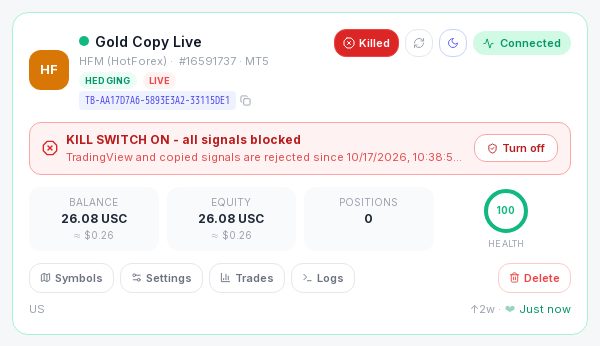
What it blocks and what it does not
| Thing | Kill switch ON |
|---|---|
| Your TradingView alerts - entries | Blocked |
| Your TradingView alerts - closes, close all, SL/TP changes, cancels | Blocked too |
| Copied trades from a group you follow - entries | Blocked |
| Copied closes from a group you follow | Blocked too |
| Trades that are already open | NOT touched - they stay open |
| Stop loss and take profit already on your trades | Still work - the broker closes the trade at those prices |
| Trades you place by hand in MT5 | Not affected - you can always trade and close by hand |
| The terminal itself | Keeps running and connected - only signals are refused |
Every blocked signal shows in the Signal Log as Error with the message "Kill switch is ON for this terminal - signal not executed" (for copies, "(copy from <group>)" is added).
Blocked signals are never replayed
When you switch the kill switch OFF, only NEW signals are accepted. Anything that came while it was ON is gone - if you still want one of those trades, place it by hand.If you follow a copy group
- •No new copies are opened on that terminal. Each blocked copy is listed as skipped for the group, and your Signal Log shows it.
- •IMPORTANT: the leader's closes are blocked too. A copied trade that is open when you switch the kill switch on will NOT be closed when the leader closes - close it yourself in MT5, or switch the kill switch off before the leader closes.
- •You stay a follower of the group. Turning the kill switch on is not the same as pausing - to stop copying properly use Pause or Stop following on the Copying page.
If you lead a copy group
- •Your blocked alerts never become trades, so nothing is copied to your followers either.
- •Manual trading groups: the kill switch blocks signals, not your hands. A trade you click in MT5 is still a real trade on your account and is still copied to your followers. To stop copying, pause the group in My Groups.
- •Leader → Analytics lists your terminal under Health while its kill switch is on, so you do not forget it.
Good to know
- •The kill switch belongs to ONE terminal (one license). Your other terminals keep trading.
- •If several terminals use the same license key, the switch applies to all of them - the question tells you so.
- •You get a Telegram message when the kill switch is turned on or off (if Telegram is connected in Settings).
- •Want to stop a terminal only for a while without blocking closes? Use Terminal Settings (e.g. max open trades) or pause the alerts in TradingView instead.