For Leaders (Alerts)
Lead a copy group with your TradingView strategy: every trade your alerts open is copied to your followers, and you earn a share of the profit they make with you.
In simple words
You already trade with alerts. Becoming a leader means: make a profile, make a group, give it a magic number, and put that number into your alerts. Then people can follow you, and every Friday TradeHookX bills them your share of their profit.Prefer to click buy and sell yourself in MT5? See Manual Trading Groups - most of this page applies there too.
What you need
- •The Professional plan. On another plan, the sidebar shows Become a leader, which opens the upgrade (free during a trial).
- •A terminal for the group - a cloud terminal is best, because your trades are only copied while your terminal is online and reporting.
- •A hedging account if this terminal will lead more than one group.
- •A payout method (Settings → Payouts) so you can receive your earnings - see Invoices & Payouts.
1. Leader profile
Leader → My Groups → Setup profile. This is what followers see in the Marketplace:
| Field | Tip |
|---|---|
| Display Name * | How followers see you, e.g. "Sarah Chen - Gold". Not your email. |
| Bio (optional) | A sentence or two about you. |
| Trading style | e.g. Swing, Scalping. |
| Risk level | Low / medium / high - be honest; followers filter by it. |
| Description | Strategy, minimum deposit you recommend, how much risk. |
Our team approves new leader profiles and public groups. Until then a public group shows Pending approval; after approval it shows Live.
2. Create a group
My Groups → New Group. The form has five parts:
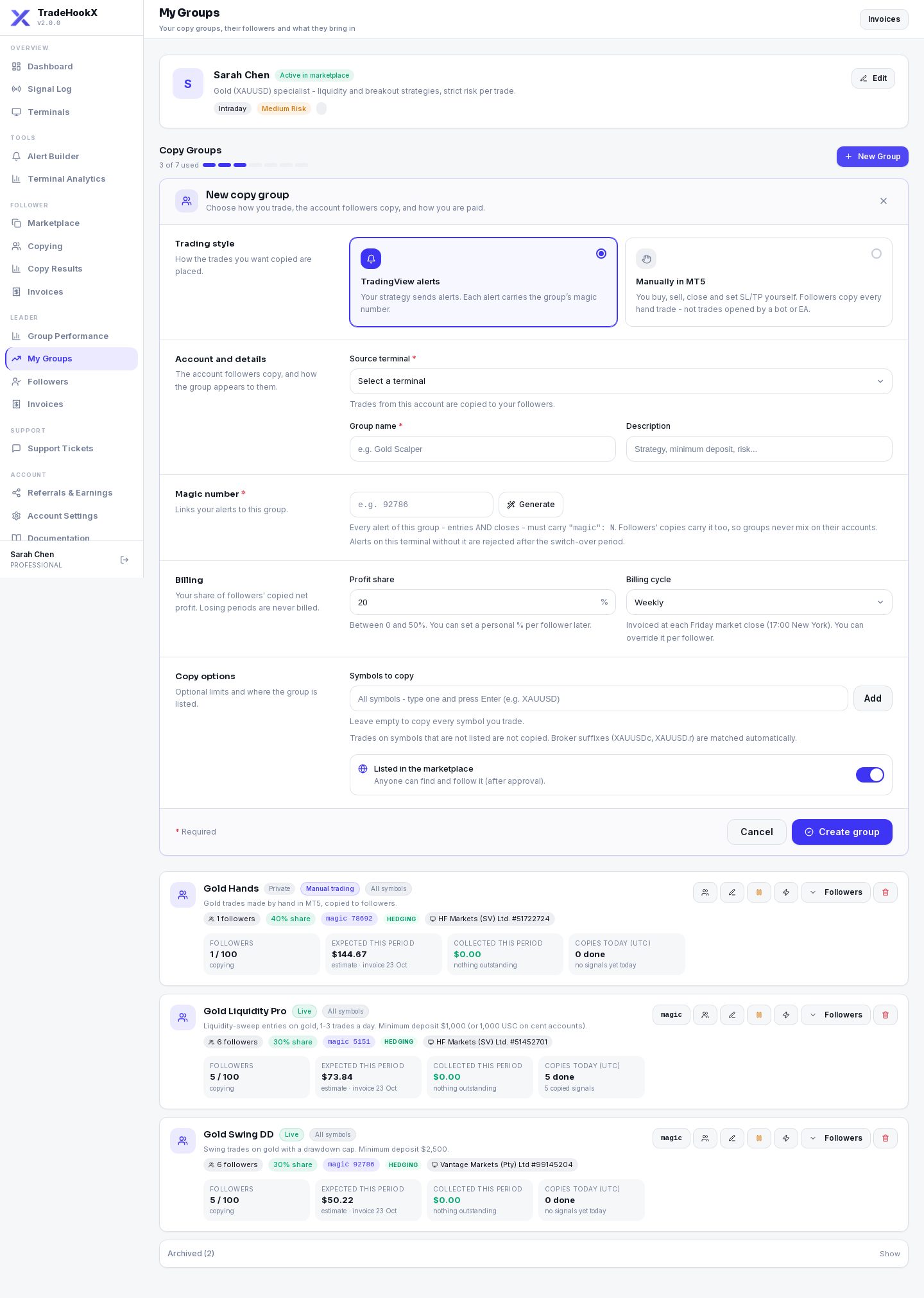
| Part | Field | What it means |
|---|---|---|
| Trading style | Alerts / Manually in MT5 | Alerts = your strategy sends TradingView alerts. Fixed once the group exists. |
| Account and details | Terminal | The account followers copy. |
| Group name / Description | e.g. "Gold Breakout 2B" and what it trades, how often, how risky. | |
| Symbols to copy | Optional. Only these symbols are copied (XAUUSD also covers XAUUSDc, XAUUSDm...). Empty = every symbol you trade. | |
| Magic number | Magic | Required. The number that links your alerts to this group. Type one or click Generate. It cannot be used by any other group. |
| Billing | Profit share % | 0-50% of the follower's copied profit. You can give single followers a personal % later. |
| Billing cycle | Weekly (each Friday market close, 17:00 New York) or Monthly (last Friday of the month). | |
| Copy options | Max followers | Optional limit. |
| Listed in the marketplace | On = anyone can find and follow it (after approval). Off = private, hidden from the marketplace. |
| Message | Why |
|---|---|
| Set up your leader profile first | No profile yet. |
| All groups in use - add one | Each terminal includes 1 led group. Buy an extra lead group ($14.99 / month) in Settings → Billing. |
| This is a netting account / already leads ... | A netting account can be in only one group. |
| Magic N is already used by another ... | Another group uses that number - pick another or click Generate. |
3. Put the magic into your alerts
On the group card click the magic pill to copy the alert line. Every alert on this terminal - entries AND closes - must carry it:
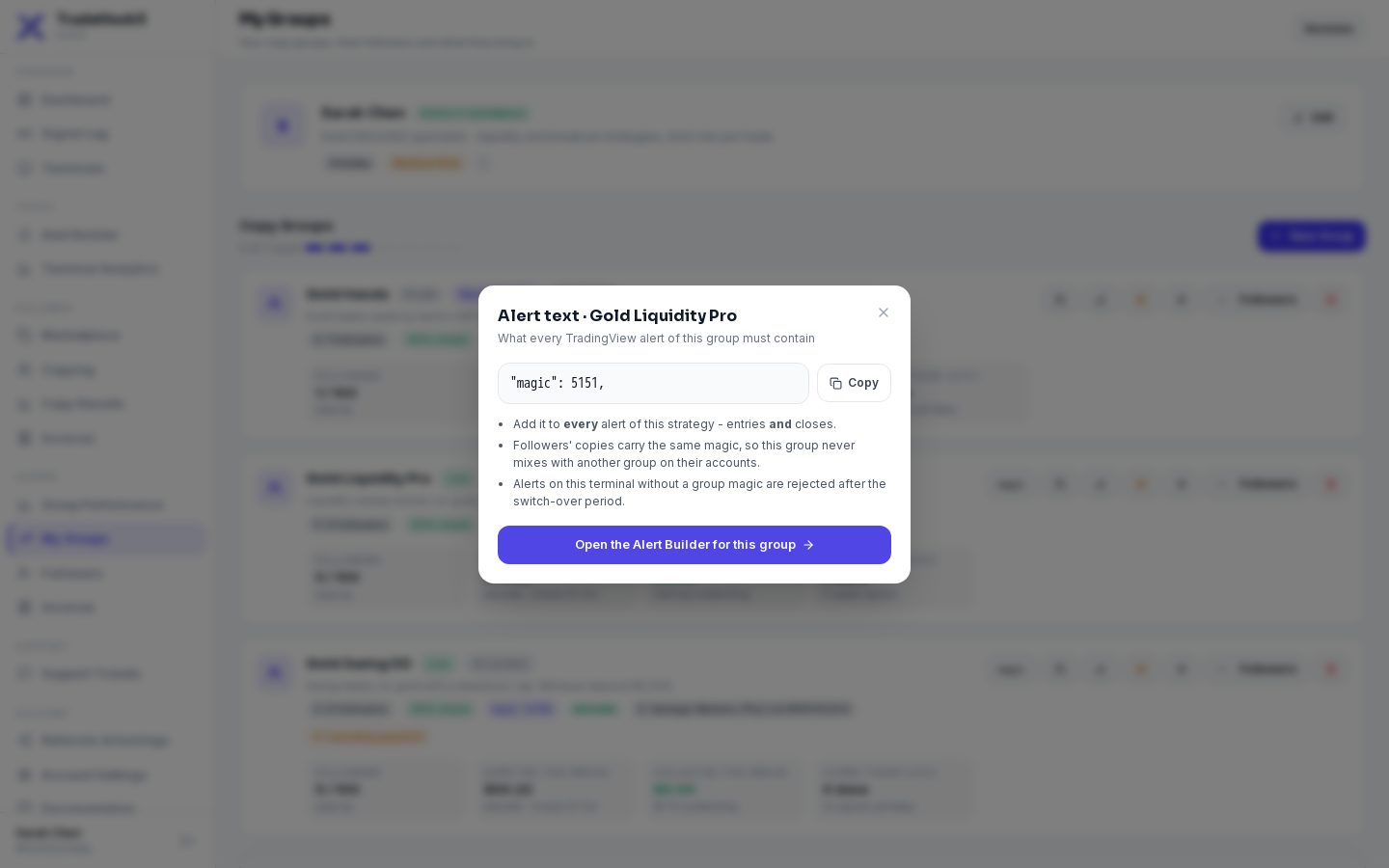
- •Easiest: click Open the Alert Builder for this group - the terminal and magic are filled in. Save, Get JSON, paste into TradingView.
- •Already have alerts? Add "magic": <number> to each message, or edit the template and copy the JSON again.
- •The Alert Builder shows a "Use 5151 (group name)" button whenever you build an alert for a terminal that leads a group.
From Saturday 24 Oct 2026 12:00 UTC the magic is enforced
On a terminal that leads a group, an alert whose magic matches none of its groups is REJECTED (Signal Log: "Signal not executed: ...") - that includes your own non-copy alerts on that terminal. Until then such alerts still execute with a warning in the Signal Log. Run other strategies on another terminal, or give them their own group.4. My Groups
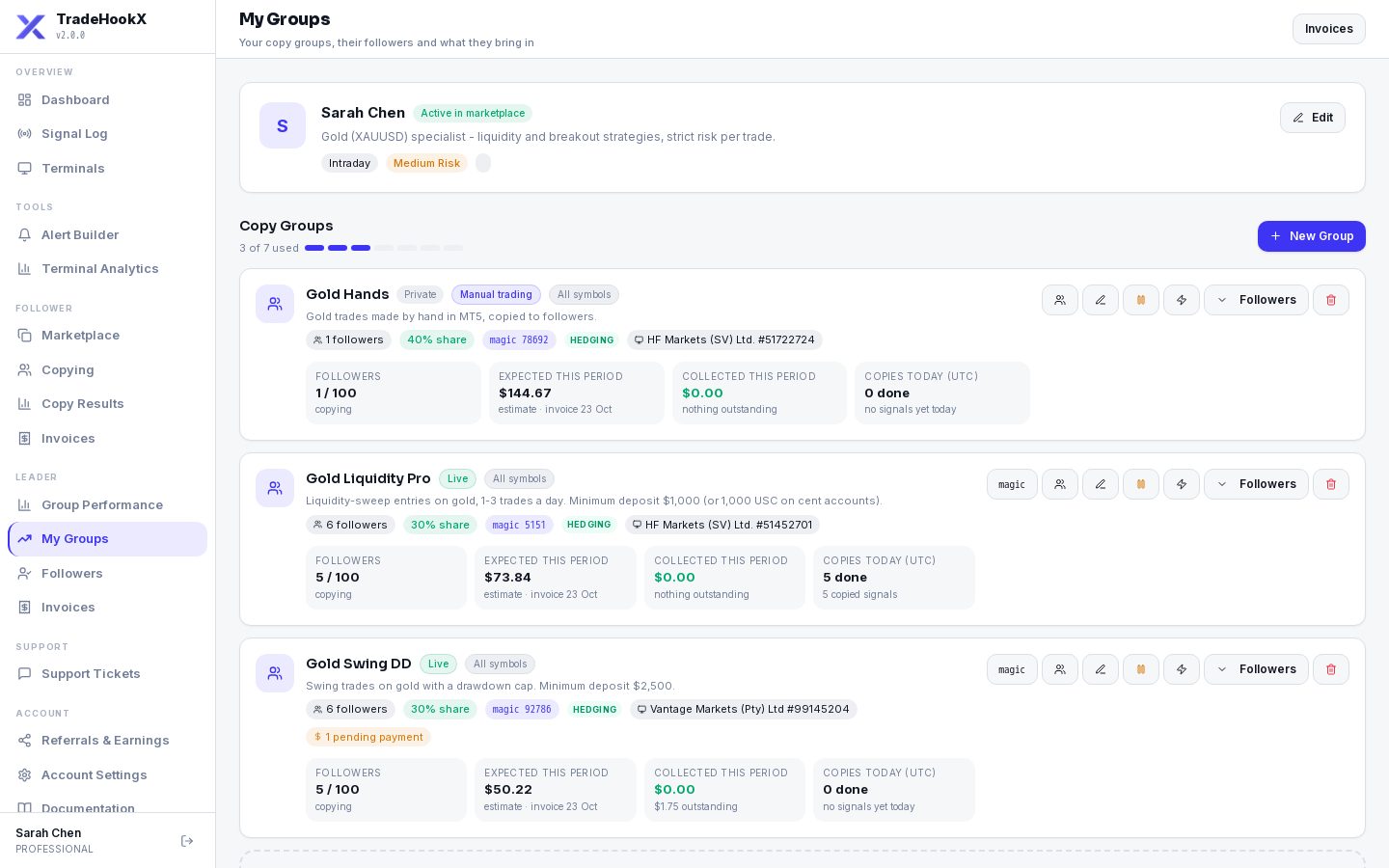
My Groups
| Card part | Meaning |
|---|---|
| Live / Pending approval / Private | Whether followers can find it. |
| Mode and kill-switch badges | Hedging / netting, and a red badge if the terminal's kill switch is on. |
| Followers | Copying now (and how many paused) of the maximum. |
| Expected this period | An estimate of your share on followers' copied profit since the last invoice date. |
| Collected this period | What followers have actually paid this period. |
| Copies today (UTC) | Copies executed / failed / waiting today - a quick health check. |
| Buttons | Magic (alert line), Edit, Billing, Followers, Pause / Resume, Delete. |
Editing a group
| Change | What happens |
|---|---|
| Name, description, symbols, max followers, marketplace | From now on. |
| Profit share % | From each follower's NEXT billing period - the current one is billed at the old %. Followers are told by email / Telegram. Tick "apply to all" to also replace personal %s. |
| Billing cycle | From each follower's next period. |
| Magic number | Asks first: your open trades with the OLD magic are no longer closed by alerts with the new one - close them first. Followers' copies still close normally. Update every alert. |
| Terminal | Close all open positions first - trades on the old terminal are not tracked on the new one. |
Pausing and deleting
| Action | What happens |
|---|---|
| Pause group | Followers stop receiving NEW trades and are notified. Open copies still close with you. Followers stay members; Resume starts copying again. |
| Delete (no followers, no invoices) | Removed for good. |
| Delete (with followers or invoices) | The group is archived: followers are unfollowed, history and invoices are kept, the magic becomes free. Open copies still follow your closes. |
Several groups
- •Several alerts groups can trade the same symbol on one terminal - each alert's magic decides which group it belongs to. The terminal must be a hedging account.
- •Each terminal includes one led group; more cost $14.99 / month each.
- •Running groups are never switched off if your allowance shrinks - you just cannot create or resume more.
Earning
- •Followers are invoiced automatically; you see every invoice in Leader → Invoices.
- •Card payments go to your bank (via Stripe), crypto payments to your USDT (BEP20) wallet - see Invoices & Payouts.
- •Managing followers (personal %, billing cycle, remove, Follower 360) and Group Performance: see Managing Followers.
Your responsibilities
Followers trust your trades with real money. Keep your terminal online, keep the magic on every alert, describe your risk honestly, and pause the group before you change your strategy.