Manual Trading Groups
Not using TradingView? Lead a group by trading with your own hands. You click buy, sell and close in MetaTrader 5 - on your PC or your phone - and every follower gets the same trade.
In simple words
Your cloud terminal is like a camera pointed at your account. Whatever you do by hand - from the MT5 app on your phone, your PC, or the cloud terminal itself - it sees, and it copies the same to your followers.How it works
You trade by hand
MT5 on PC or phone
Same account
the trade lands at the broker
Cloud terminal
sees it and reports it
Followers
get the same trade
What you need
- •The Professional plan and a leader profile (see For Leaders).
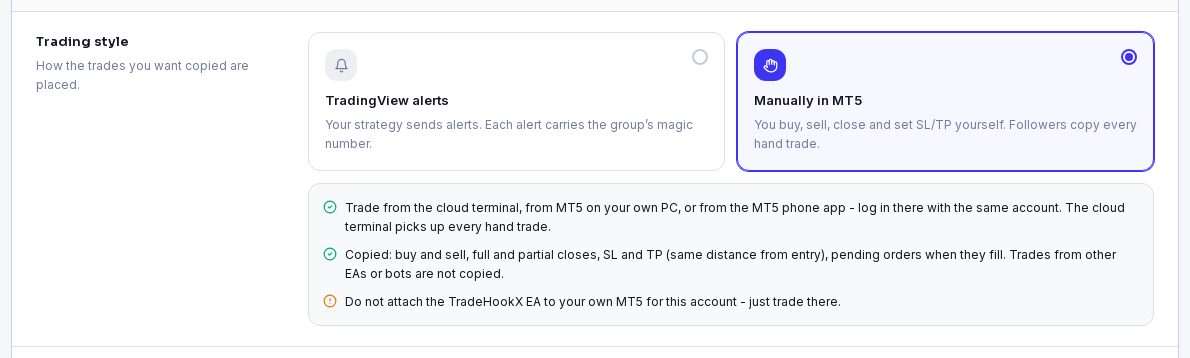
- •A CLOUD terminal for that MT5 account. Only a cloud terminal can lead a manual group - it watches your account 24/7, so copying never depends on your PC being on.
- •Log in to the SAME MT5 account on your PC or phone to trade. Do NOT attach the TradeHookX EA there - just trade. (TradeHookX refuses a second EA on a cloud license.)
Create the group
My Groups → New Group → Trading style: Manually in MT5
"You buy, sell, close and set SL/TP yourself. Followers copy every hand trade." The trading style is fixed once the group exists.
Pick your cloud terminal, name and symbols
Symbols to copy: leave empty to copy every symbol, or list the ones this group copies (needed when you run several manual groups on one terminal - see below).
Magic number, billing and options
The magic is stamped on every copy in your followers' accounts, so their copies of this group never mix with anything else. Type one or click Generate. Billing and options are the same as for alerts groups.
What is copied
| You do (by hand) | Your followers get |
|---|---|
| Buy or sell | The same trade, in their own size, as a new position. |
| Set a stop loss / take profit when you open | The same DISTANCE from their own entry. You buy at 2,000 with SL 1,990 (10 below); a follower filled at 2,000.50 gets SL 1,990.50. |
| Close the trade | Their copy is closed. |
| Close part of it | The same part of their copy. |
| Place a pending order | Nothing until it fills - then a normal market trade. |
| Your SL or TP is hit | It is a close: their copy is closed too. |
| Not copied | Why |
|---|---|
| Trades from other EAs or bots on the account | Only hand trades (magic 0) are copied. |
| Moving your SL / TP after the trade is open | Copies keep the SL / TP they got at the start; they still close when you close. |
| Trades on a symbol not in the group's list | Listed in your Signal Log with a warning "Hand trade on X not copied ..." |
| Your TradingView alerts on the same terminal | Alerts carry a magic - they belong to alerts groups, not to the manual group. |
Followers decide about SL / TP
A follower can switch off Copy stop loss / Copy take profit in their Copy Settings. Then their copy has no SL / TP and closes only when you close.Several manual groups on one terminal - split by symbol
One account can lead several manual groups as long as each symbol belongs to only one of them:
| Group | Symbols | Your hand trade on... | Goes to |
|---|---|---|---|
| Gold Hands | XAUUSD | XAUUSD | Gold Hands |
| FX Majors | EURUSD, GBPUSD | GBPUSD | FX Majors |
| US100 | Nobody (not listed) - warning in your Signal Log |
- •Broker names are matched automatically: XAUUSD also covers XAUUSDc, XAUUSDm, XAUUSD.r.
- •If one manual group copies EVERY symbol, it is the only manual group that terminal can have.
- •Two groups on the SAME symbol on one account are impossible - open a second MT5 account (a second terminal) for that.
Good to know
- •The cloud terminal must stay online and on the newest EA (v2.26 or later) - older EAs cannot report hand trades.
- •Followers on an older EA (before v2.22) get your trades without SL / TP.
- •The kill switch blocks signals, not your hands: hand trades are still copied. Pause the group to stop copying.
- •Quick double trades are fine: two hand trades on the same symbol a second apart are both copied.
- •Followers are billed exactly like in alerts groups - see Invoices & Payouts.