Signal Log
The Signal Log is the diary of your account. Every alert, every copied trade and every close is written here - with what happened and, if it failed, why.
In simple words
Whenever something "did not trade", look here first. Find the signal, open it, and read the reason in red. Nine times out of ten the reason tells you exactly what to fix.The list
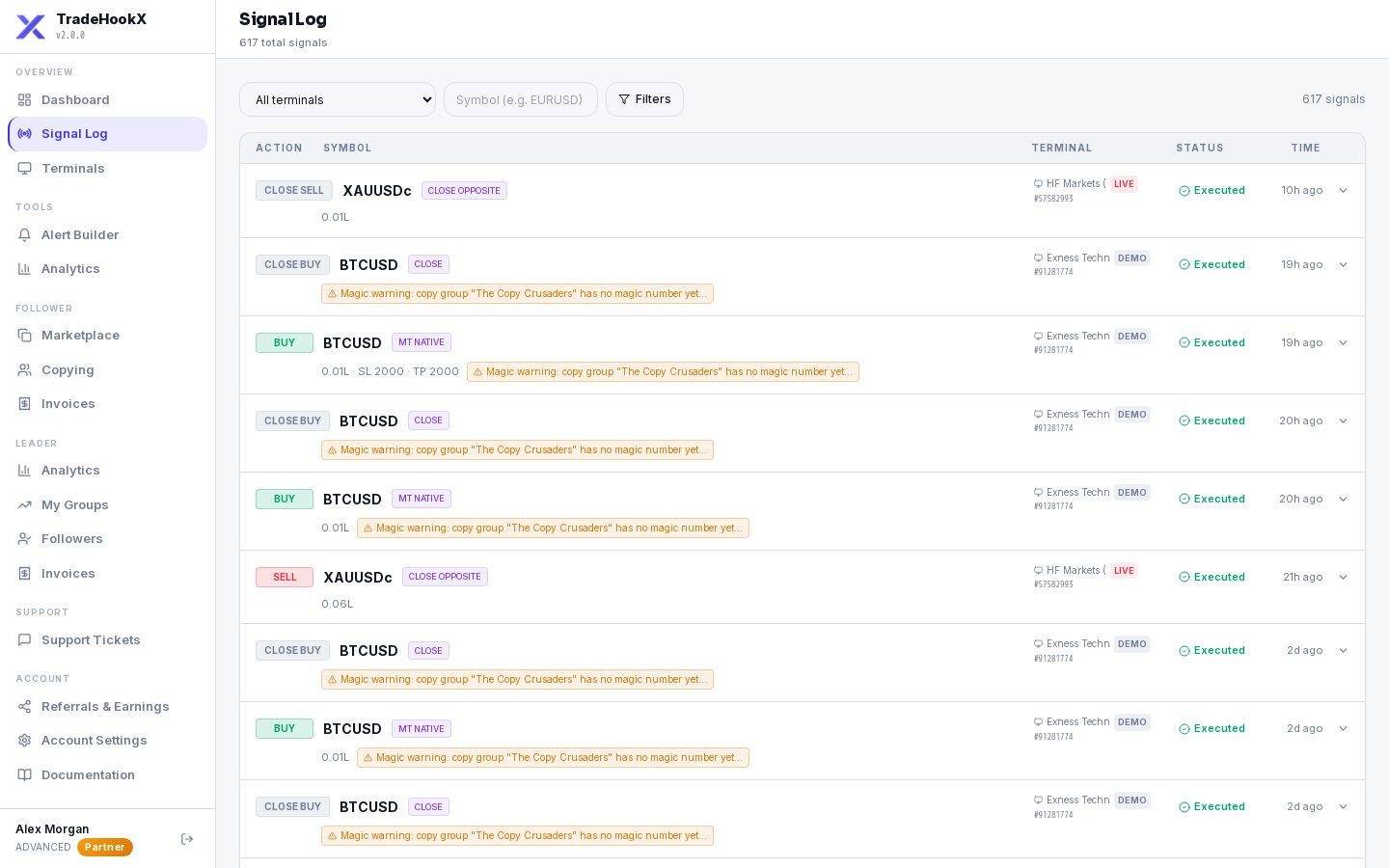
| Column | Meaning |
|---|---|
| Time | When the signal arrived (your local time). |
| Action | buy, sell, closelong... Copies of a leader's trade and copied closes are listed on YOUR account like any other signal. |
| Symbol | The symbol the signal was for (after your symbol mapping it may trade under another name). |
| Terminal | Which terminal it was for. |
| Status | What happened - see below. |
Statuses
| Status | Means |
|---|---|
| Executed (green) | The EA did it - the trade opened, closed or the order was placed. |
| Failed (red) | It did not happen. Open the row for the reason. |
| Queued (amber) | Waiting to be picked up by your terminal - normally less than a second. |
| RECEIVED / EXECUTING (grey) | Arrived and on its way. If a signal stays like this for over a minute it is marked Failed with "No execution result received within 60s". |
Filters
- •Status: All, Executed, Failed, Queued, Received.
- •Terminal: one terminal or all.
- •Symbol: type e.g. EURUSD.
- •Date range: Today, 7 days, 30 days, All time.
- •How far back you can look depends on your plan: Starter 90 days, Advanced 1 year, Professional everything. Nothing is deleted - after an upgrade older history appears again.
Open a signal
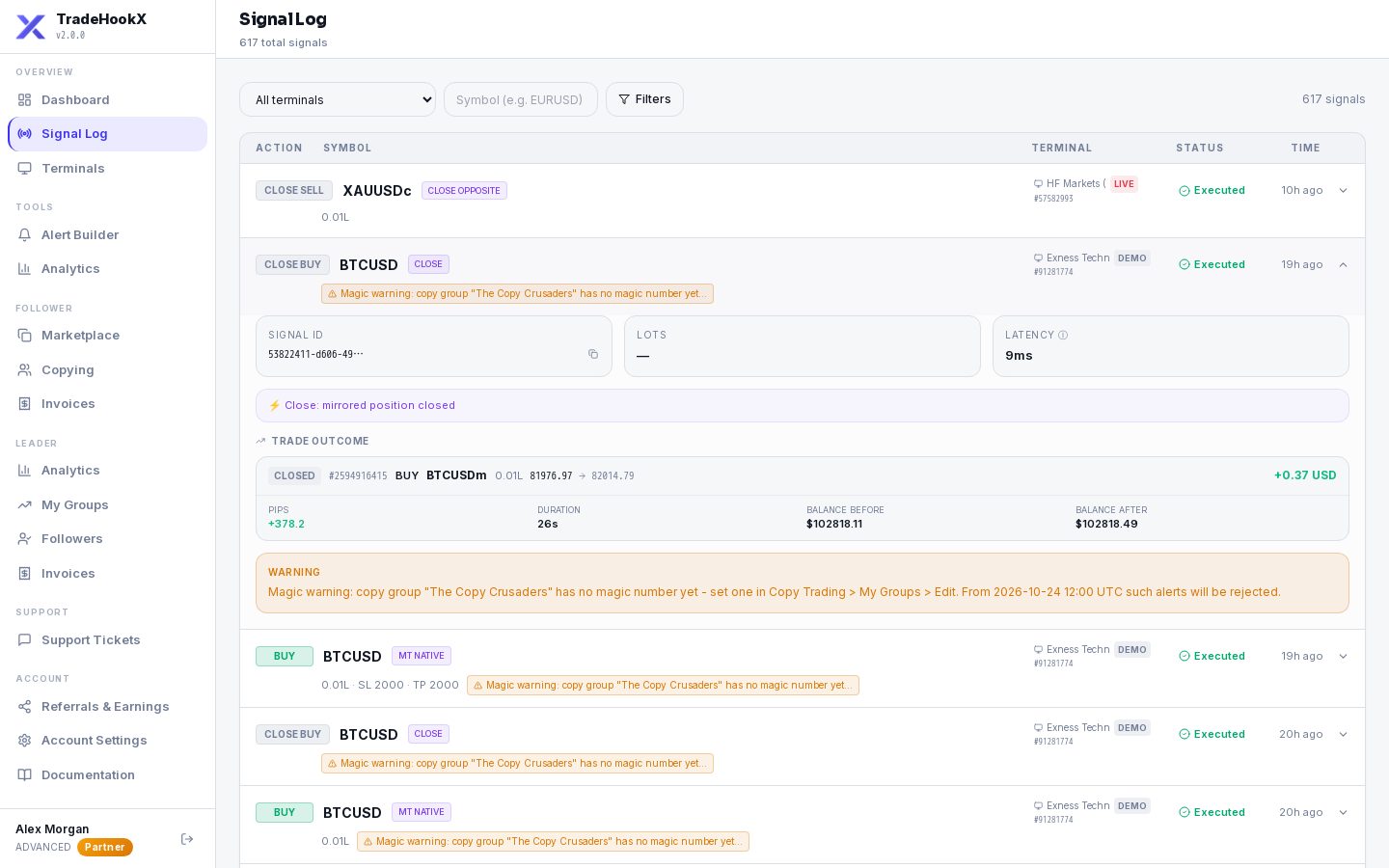
Click a row to see the details:
| Part | Meaning |
|---|---|
| Signal ID | The unique number of this signal. Copy it with the icon and send it to support - we find it at once. |
| Lots / Size (units) | The size. For strategy alerts with a multiplier you see the sum, e.g. 100 × 0.0001 = 0.01 lots. |
| Latency | How long TradeHookX took to pass the signal on (server time, not counting the internet trip). |
| Execution line | What the EA did: Close Opposite / Flip / MT Native / mirrored close. |
| Error details | The reason it failed (red box). |
| Warning | It executed, but something needs your attention - e.g. a copy-group magic warning. |
| Terminal Execution | The answer from MT5: ticket number or error. |
| Trade Outcome | For executed signals: open / closed, lots, profit, duration, and balance before and after. |
| Show raw signal | The exact message that arrived - useful to spot a typo in a hand-written alert. |
"0.03L still open"
On a partial close the amber badge shows how much of that trade was still open right after that close - not necessarily now. If later closes took the rest, the trade is flat even though the old row still shows the badge.Common errors and what to do
| Error | What it means | What to do |
|---|---|---|
| No price for XAUUSD after 5s wait | MT5 has no symbol with that name, or no prices for it right now. | Add a Symbol Mapping; add the symbol to Market Watch; check the market is open. |
| No matching positions found | A close found no trade with that symbol, direction and magic. | Use the same magic on entry and close alerts. See Closing Trades. |
| OrderSend failed: 10019 (No money) | Not enough free margin for that lot size. | Smaller lot, lower copy multiplier, or more money in the account. |
| Invalid stops | The stop loss or take profit is too close to the price or on the wrong side. | Use a larger distance or the Percentage type (see Signal Syntax - pips). |
| Market closed | The broker does not trade that symbol right now. | Wait for the session to open. |
| Signal expired - ... | It reached the terminal too late (entries 30 s, closes 55 s), usually after a restart or outage. | Check the terminal is online; trade by hand if still wanted. |
| No execution result received within 60s | The terminal never answered. | Check the terminal card: Offline? EA running? See Troubleshooting. |
| Daily loss limit hit / Max trades limit hit / Outside trading hours / Pending orders disabled | A rule in Terminal Settings blocked a new trade. | Expected - or change the setting. |
| Kill switch is ON for this terminal - signal not executed | The kill switch blocks every signal. | Turn the kill switch off. |
| Signal rejected: TradingView username mismatch / No tv_username | TradingView binding is on and the message does not carry your username. | Get JSON again from the Alert Builder and paste it into TradingView. |
| Signal not executed: ... magic ... | This terminal leads a copy group and the alert has the wrong or no magic. | Add the group's magic to the alert (For Leaders). |
| ... (copy from Gold Liquidity Pro) | A copy of a leader's trade failed on your account - the text before it is the reason. | Fix the reason (margin, symbol mapping, kill switch...). |
| Free trial: one copied trade is included and it has been used ... / Your free trial has ended - this terminal only accepts closes ... | Free-trial limits. | Subscribe to a paid plan - see Billing. |
Good to know
- •Alerts refused because of a wrong license key or a broken message never reach your account, so they are not in your Signal Log - look at TradingView's alert log instead.
- •Trades you open by hand in MT5 and trades the EA reports also appear, so the log matches your MT5 history.
- •The dashboard bars (blue executed / red failed) are a summary of this log.