For Followers
Everything about copying a leader: choosing a group, following it, deciding how big your copies are, pausing or stopping, seeing your results and paying the leader's share.
In simple words
You pick a leader in the Marketplace, choose which of your MT5 accounts should copy, and how big the copies should be. That is all - from then on the leader's trades appear on your account by themselves. You only pay when you made money.What you need
- •The Advanced or Professional plan (during the free trial: 1 group and 1 copied trade - you can switch to Advanced for free for the rest of the trial).
- •A terminal that is online - a cloud terminal is best, because copies arrive day and night.
- •A hedging account if you want to follow more than one group on the same terminal (see How Copy Trading Works).
- •Enough money for the leader's trade sizes. Check the group's symbols and the lot sizes the leader uses.
1. Find a group in the Marketplace
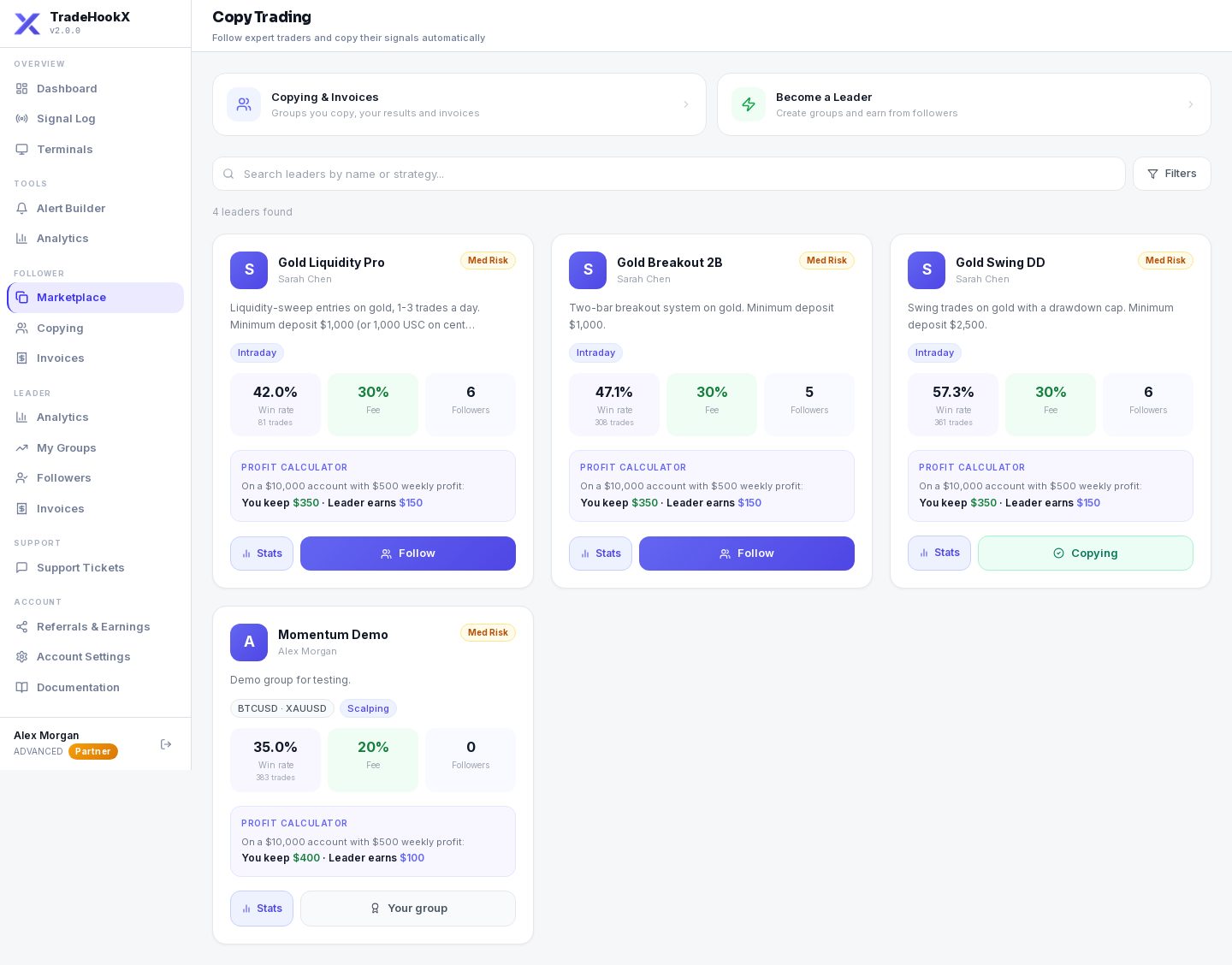
- •Search by name or strategy, or filter by risk level (the leader's own rating: low / medium / high).
- •Each card shows the leader, the group, followers, win rate, the profit share % and whether it is a Manual trading group.
- •The profit calculator shows what you keep and what the leader gets on an example profit.
- •Groups you already copy show ✓ Copying or Paused instead of Follow. Your own groups show Your group.
2. Follow
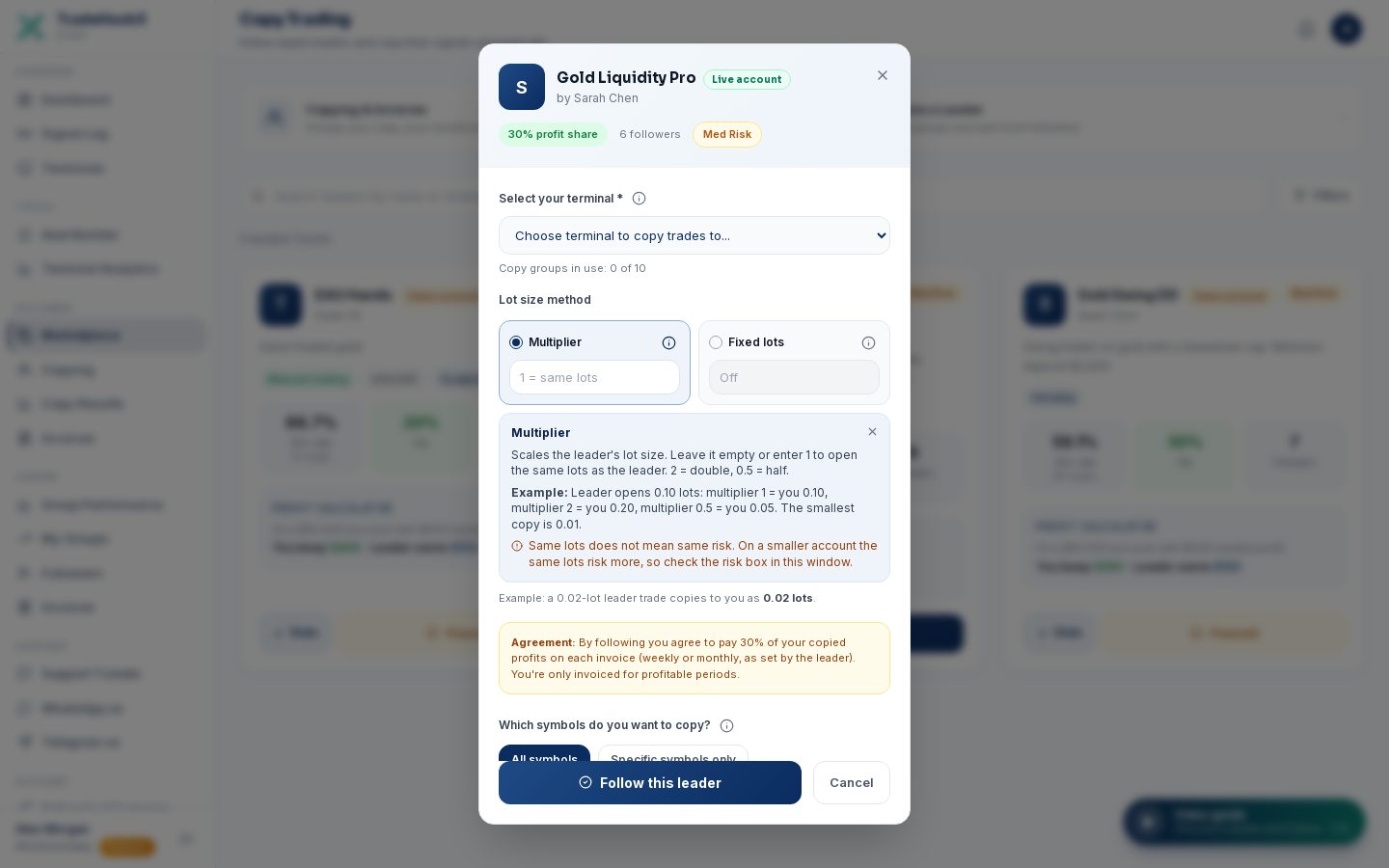
Select your terminal
Which of your MT5 accounts should copy. Only connected terminals are listed.
Lot size method
Choose one method. The other field is greyed out and off. The (i) beside a field explains it.
| Method | What it does | Example |
|---|---|---|
| Multiplier | Your copy = the leader's lots × your multiplier. Empty or 1 = same lots as the leader, 0.5 = half, 2 = double. | Leader 0.10, multiplier 0.5 → you 0.05 |
| Fixed lots | Every copy has exactly this size, whatever the leader trades. | Always 0.01 |
Your risk compared with the leader
Under the lot size the window shows how many times the leader's risk your copy size takes, measured against both account sizes. Example: the leader trades 0.12 lots on $13,000 and you copy 1.2 lots on a $43 account (4,300 USC) - that is about 31x the leader's risk, so a 5% loss for the leader wipes out your account. It also shows the multiplier (or fixed lot size) that matches the leader's risk, with a button to use it. Above 3x you must tick that you understand the risk before you can follow; the same check runs when you change the copy size in Copy settings.Which symbols to copy
Copy all the group's symbols, or tick only the ones you want. At least one must be chosen.
Read the agreement and click Follow this leader
You agree to pay the group's profit share % of your copied profit on each invoice - only for profitable periods. The leader gets a notice that you joined; you get a confirmation by email (and Telegram if connected).
| If you see... | It means |
|---|---|
| Following copy groups needs the Advanced plan | Starter cannot follow. Upgrade (or switch for free during the trial). |
| 1 copy group ... and it is in use | All your included groups are used. Add a copy group, or pause / leave another one. |
| This is a netting account | That terminal already leads or follows a group. Use another terminal or a hedging account. |
| Pay it in Follower > Invoices before following another group | You have an overdue invoice (or an unpaid one from a group you left). |
| You already follow it / paused | Resume it on the Copying page instead. |
3. The Copying page
Follower → Copying lists every group you copy as a card:
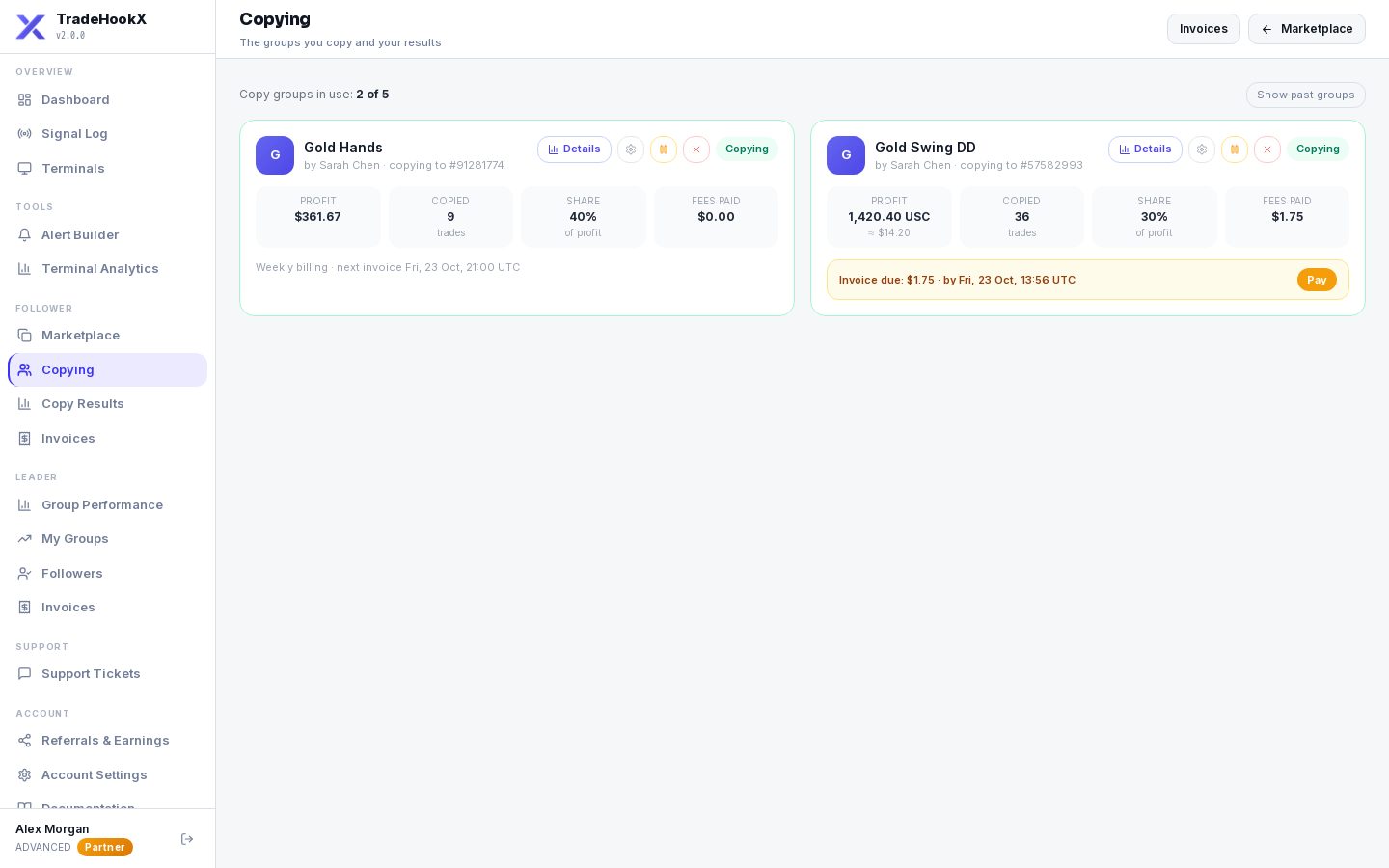
The Copying page
| Part | Meaning |
|---|---|
| Status | Copying (green), Paused (amber) or Left (grey). A pause by the system says why, e.g. "plan" when your plan no longer covers the group. |
| Paused by the leader | The leader switched the whole group off. Nothing new is copied until the leader switches it back on; copied trades already open still close with the leader. Meanwhile the group does not use one of your copy-group slots, so you can follow another group. |
| by <leader> · copying to #account | Who leads, and which of your accounts copies. |
| Profit | Your copied profit, in your account currency (cent accounts also show ≈ $). |
| Copied trades / Share / Fees paid | How many trades were copied, your profit share %, and what you have paid the leader. |
| Footer | "Weekly billing · next invoice ..." - or a red "Invoice due $X · by <date>" bar with Pay. |
| Copy groups in use: X of Y | How many of your group slots are used. Add a copy group buys another. |
4. Copy settings
| Setting | What it does |
|---|---|
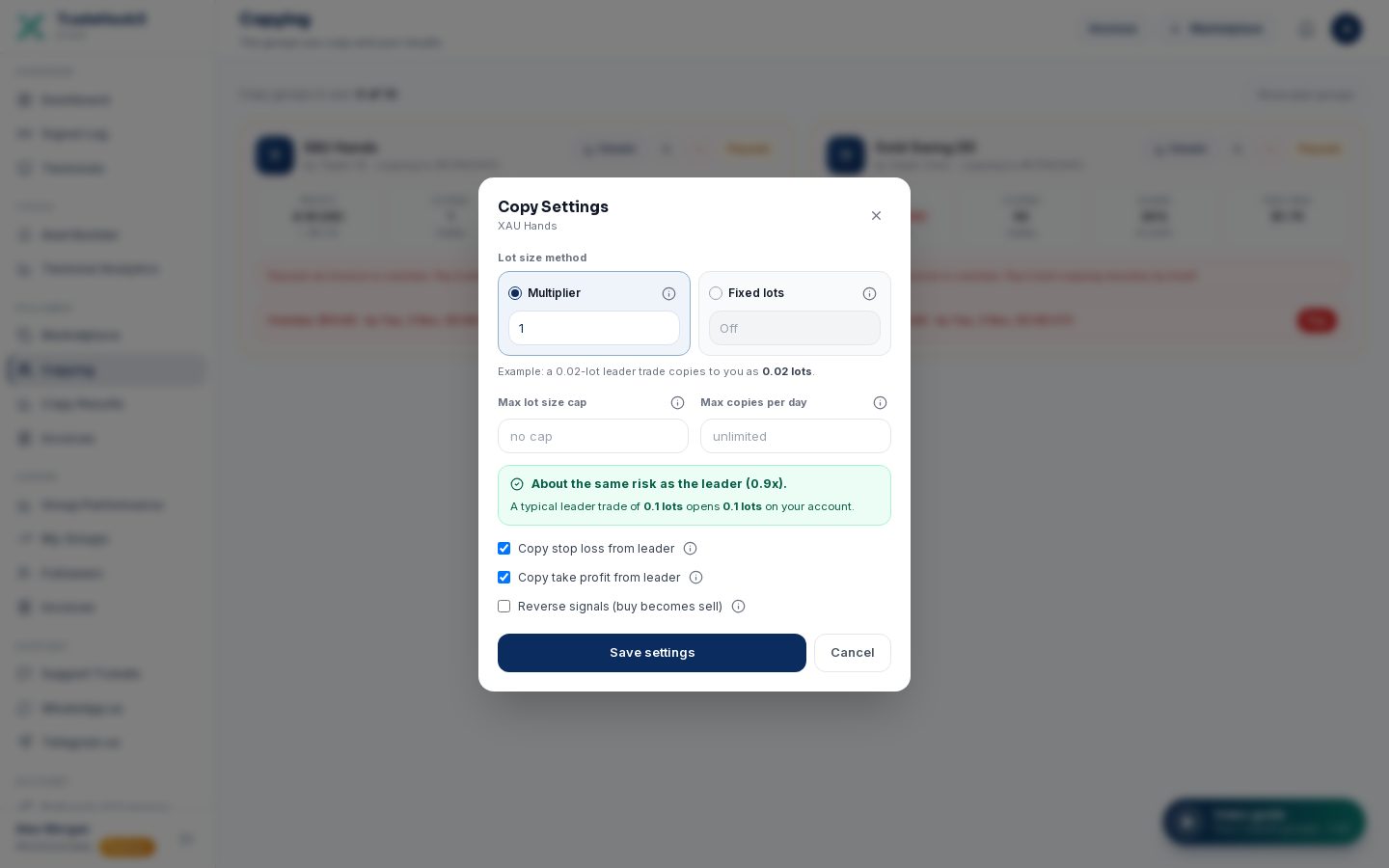
| Multiplier | Leader lots × this number. Empty or 1 = same lots as the leader. The window shows an example (a 0.02-lot leader trade copies to you as ...). Smallest copy is 0.01. |
| Fixed lots | Always this size. Choose either Multiplier or Fixed lots: the other one is greyed out and off. |
| Max lot size cap | No copy is ever bigger than this. Empty = no cap. |
| Max copies per day | After this many copies in one day (UTC), the rest of the day's trades are skipped. Empty = unlimited. |
| Copy stop loss / take profit from leader | On: when the leader sets or moves a stop loss or take profit, your copy gets it at the same distance from your entry (manual trading groups also at the open). Off: your copy gets none from the leader, neither at the open nor later, and no breakeven or trailing when the stop loss is off. A stop already on the copy stays. The copy still closes when the leader closes. |
| Reverse signals (buy becomes sell) | Copies every trade in the opposite direction (SL and TP swap). Only if you really know why. |
The most common problem: not enough margin
If the copies are too big for your account, the broker refuses them ("No money" in your Signal Log). Lower the multiplier or set a fixed lot and a max lot cap. Your Terminal Settings (daily loss limit, max trades) protect you too. Copy settings shows your risk compared with the leader for the size you enter (see step 2). When 3 copies in a row fail for margin, you get one warning by email and Telegram with the copy size and what to change (the leader is told too). After that, at most one warning a week per group.5. Details - your results
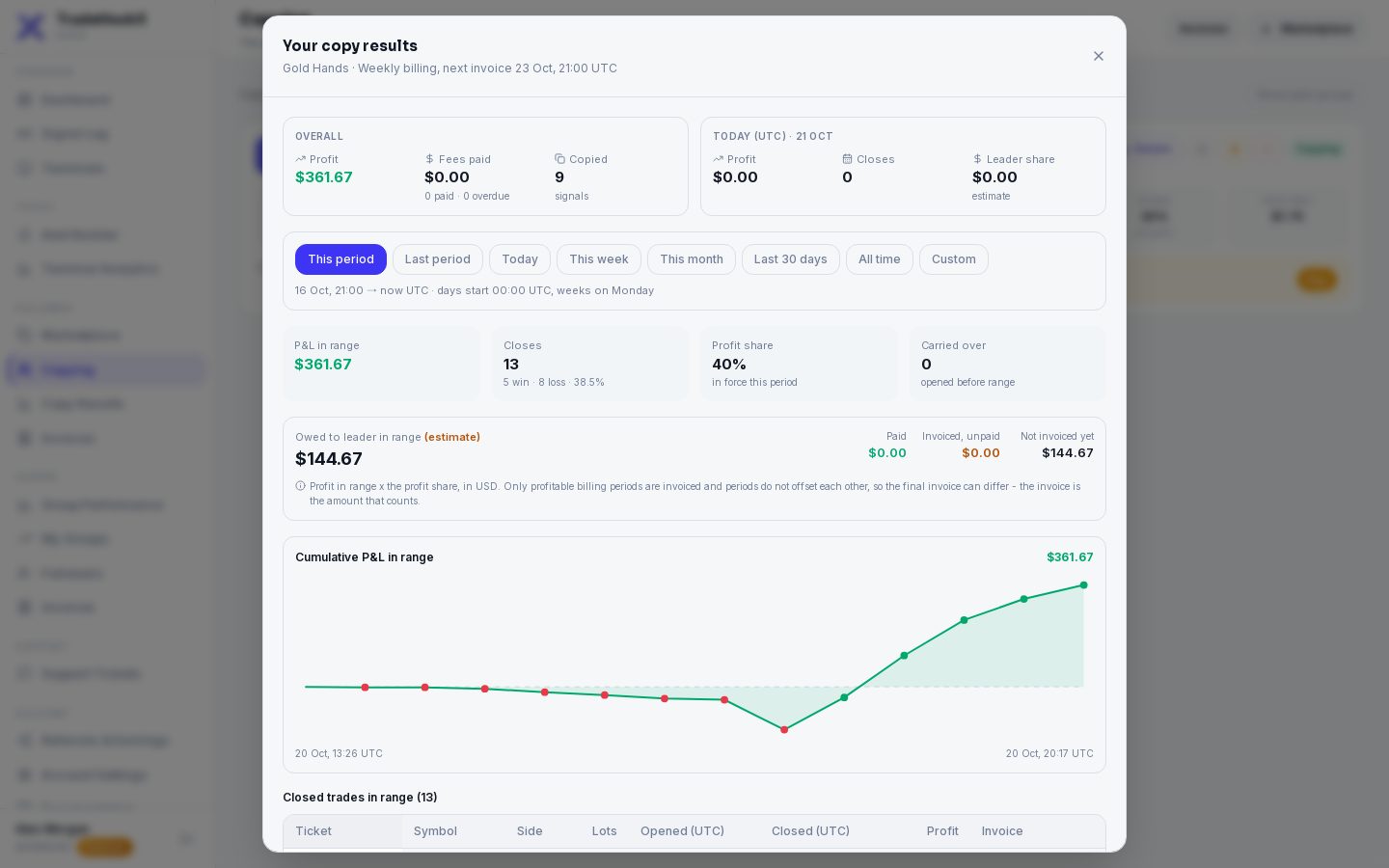
- •Ranges: This period (since your last invoice date), Last period, Today, This week, This month, Last 30 days, All time, or Custom dates (UTC).
- •Every closed copied trade: side, lots, opened, closed, profit, and whether it is already invoiced. A trade "carried over" was opened before the range started.
- •Owed to leader in range (estimate): profit share on the profit in that range. The real amount is on the invoice.
- •Still-open copied trades are not billed yet - they go on the invoice of the period in which they close.
6. Copy Results - all your groups together
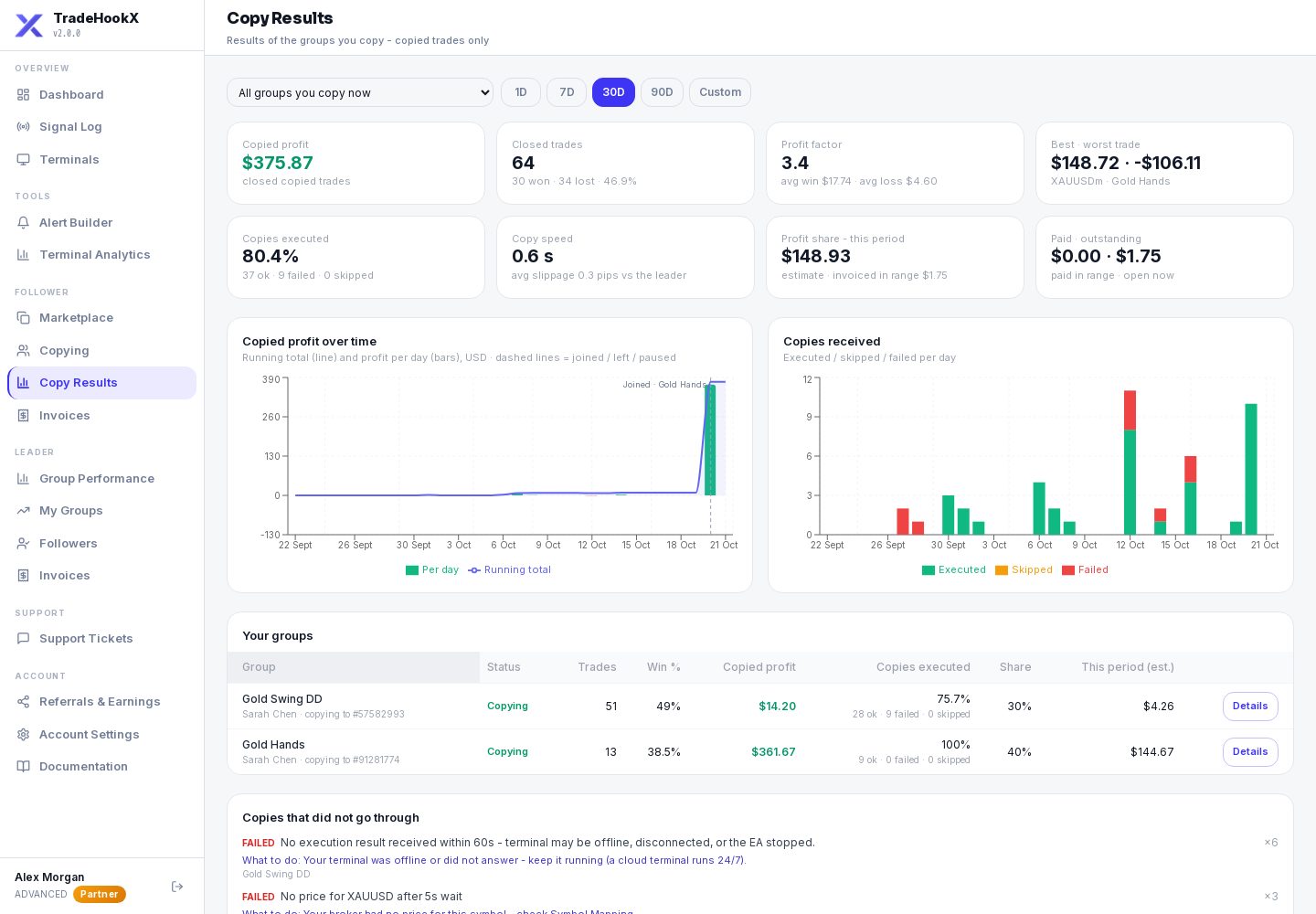
Follower → Copy Results shows the results of the groups you copy - only copied trades. Your own alerts and the trades you make by hand are on Tools → Terminal Analytics, which shows everything on your terminals.
| Part | What it shows |
|---|---|
| Group filter | "All groups you copy now" (default), or one group. Each group shows its leader and the account that copies it. |
| Period | 1D (the last 24 hours), 7D, 30D, 90D, or Custom dates (UTC). For a group you left and joined again there is also "Since rejoining". |
| Tiles | Copied profit (in USD, cent accounts also in USC), closed trades and win rate, profit factor, best and worst trade, how many copies were executed, copy speed after the leader's fill, and your profit share: the estimate for this period, invoiced, paid and still open. |
| Charts | Copied profit over time (running total + each day), and copies executed / skipped / failed. Dashed lines mark when you joined, left, paused - or when the leader switched the group off. |
| Your groups | In "All groups": one row per group - trades, win rate, profit, copies executed, share %. Details opens that group. |
| Copies that did not go through | Every reason a copy failed or was skipped, how often, and what to do about it (for example: not enough margin - lower your multiplier). |
| By symbol / Open now / Closed trades | Results per symbol, copied trades open right now with their floating profit, and every closed copied trade (CSV download). |
| Group you... | Shown? |
|---|---|
| Copy now (copying or paused) | Yes - in "All groups" and on its own. |
| Left | Not in "All groups". It stays under "Past groups" in the filter while something from it is still open: a copied trade still open, an unpaid invoice, or copied profit still to be invoiced. After that it disappears. |
| Left and joined again | Yes, with its whole history (before and after). Pick "Since rejoining" to see only the new stay. |
7. Pause, resume, stop
| Button | What happens |
|---|---|
| Pause | New trades are not copied. Copied trades already open still close with the leader. You stay a member. |
| Resume | Copying starts again with the next new trade (trades the leader opened while you were paused are not copied late). Needs a free group slot (not while the leader has switched the group off - then it uses none). Not possible while an invoice of the group is overdue (pay it - copying resumes by itself) or when the leader paused you ("Paused by the leader" - only the leader can resume). |
| Stop following | You leave the group. Open copied trades still follow the leader's closes, and profit share on copies closed while you followed is invoiced on the next billing date. Pay open invoices first. |
| Follow again | On a card you left - opens the follow window again. |
8. Invoices
Your profit share is billed automatically - weekly at the Friday market close or monthly on the last Friday, as the leader set. You get an email (and Telegram) when an invoice is made. Pay it in Follower → Invoices by card, USDT or other crypto - see Invoices & Payouts.
Unpaid = copying pauses
If an invoice is not paid by its due date it becomes overdue: copying of that group pauses, and you cannot follow another group. Pay it and copying resumes by itself.More than one group
- •Each paid terminal includes one followed group. Extra groups cost $7.90 / month on Advanced ($14.99 on Professional) - buy them in Settings → Billing → Copy groups, or from the follow window (Add a copy group).
- •Two groups on one terminal are kept apart by their magic numbers - but the terminal must be a hedging account.
- •If your plan later covers fewer groups, the newest follows are paused (plan) and resume by themselves when you upgrade.
- •A group the leader switched off uses none of your slots. If the leader switches it back on while all your slots are in use, copying from it stays paused (no free slot) and resumes by itself when a slot frees up.